There are several best to do apps in the market today, and picking the suitable one might be the difference between successfully completing your tasks or not. Therefore, it is crucial for you to have ample knowledge about what’s out there. Below we delve into trending to-do list apps. We look at the most appealing features that each of the programs has and ultimately, how helpful they are.

Task management is a very vital aspect of your life. With things to do popping up often, you, need to have an efficient plan for all of them. Of course, there is the old fashion way of writing them on paper, then crossing each item you complete. As fancy as this might be, it has some inconveniences. For, instance, you have to carry a pen and paper with you all the time. However, you can go digital with your planner and experience a more coherent method of organization.
Best to do list apps

Microsoft To Do List App

This cloud-based software is among the best to do list apps, and you can integrate it with other programs like Outlook and Wunderlist. Microsoft To-Do is compatible with Office 365, hence, you can use it to manage your business chores. It has a feature called My Day which lets you outline the tasks to be done within the day.

This tool is handy especially if you have long term items on your plan. It avoids confusion and helps prioritize your activities.

Merits

  • It is free: This app is free for the basic features, but you have to subscribe for more advanced tools like calendar sync.
  • User-friendly: The software’s interface is straightforward and simple to navigate.
  • Synchronization: you can sync other Microsoft apps like Outlook to move all your tasks to a single platform. Additionally, Microsoft To Do is compatible with several devices and operating systems including Android and iOS.

Demerits

  • Limited optimization: Although you can create distinct tasks lists, you can not tailor them further.
  • Only one calendar integration: Microsoft To-Do can only sync with Outlook calendar which is very limited and rarely used as opposed to others such as Google calendar.
  • Does not have a repetitive tasks feature.

TickTick as a Best Free to-do app

This is another trending shared to-do list app. You can share your plan with your friends or colleagues. Tick Tick also has a recurring activities tool that allows you to set the repetition time as per your needs. Additionally, like most planners, this app comes with a smart reminder feature, Pomodoro, that reminds you of all your due tasks. This ensures that you do not miss any item on your list.

Merits

  • There is a free version: You can get the basic functions for free. But, if you want advanced ones like theme customization and viewing prior tasks, you have to pay.
  • Easy to use: This to do list app has a simple dashboard. You can also drag and drop tasks from your calendar to TickTick.
  • Facile time tracking: It has a reminder that assists you in successfully completing your agendas.

Demerits

  • Doesn’t sync with other apps: Although TickTick lands on our Best To do List Apps checklist, it does not integrate with other planning software.
  • Non-extensive free version: managing huge projects might be a problem with this application, especially on the free version. You only get 9 indexes, each with 99 entries and 19 subtasks.

Todoist- a Shared to-do list app

Even though this program started with simple features, it has now improved becoming one of the best free to-do apps. It has powerful attributes such as Smart Schedule. With this feature, you are able to colour code your tasks, prioritize them according to their due date and set reminders. Another aspect is the Todoist Karma. This awards you points for every task you finish. You can also monitor the progress of your projects through a summary offered in graphs.

Merits

  • Available over the internet: This means that you can find your To do list online.
  • Great integration: You can easily add third party planning apps by synchronizing, including Outlook and Gmail. Additionally, you can add a Chrome extension to your browser.
  • Free: Downloading the starter pack costs nothing. However, like it’s the case with other to-do list apps, you have to subscribe to unlock more features. For instance, the basic version offers 80 projects. The Business subscription on the other hand has up to 500 projects.

Demerits

  • Cumbersome when creating tailor-made lists: If you are making plans for more than a week, locating the filter is hard. The app comes with only an integral Today and Next 7 Days tabs.
  • Issues with Windows downloads: Todoist fits perfectly with mobile software and iOS. However, the interface available for Windows is a bit tricky to navigate.
  • No built-in time tracker.

Any.do: a Shared to-do list app

With a drag and drop option, this is a simple app to use. There are also tasks and subtasks folders to help you further divide your projects. The most amazing feature in Any.do is the Voice Entry that acts as a virtual assistant. You can talk to your device and the app will note down your checklist systematically. This is not only time-saving but also worthwhile especially if you are not a fan of typing.

Merits

  • Add notes on tasks: If an entry requires extra information, you can type such within the task. Additionally, you can attach as many files as you like to each task.
  • Wonderful organization traits: Any.do lets you create various themes for your projects. You can even use colours to classify your tasks.
  • Integrated calendar: With this, you can sync your tasks with your calendar.

Demerits

  • Limited complimentary characteristics: The major features are only available on the Premium version.
  • No reports: You do not get summaries for your performance.

Best free to-do app: Things

If you are looking for elegance, then this is the app to pick. Things is designed for iOS and Mac. The header feature lets you classify your tasks into subtasks and create timelines for each. There is a built-in timer and reminder to ensure that you never miss your goals. With Things, you can supervise the progression of your checklist using pie charts. Furthermore, there is an upcoming tasks tab that gives you a heads up on the activities that you need to get into soon.

Merits

  • Templates: These are especially vital if you are managing several recurring tasks that have distinct requirements often. You can get multiple templates with Things.
  • Very intuitive: Things helps you arrange your projects from the largest to the smallest creating a diversity of options.

Demerits

  • Restricted compatibility: It is only available for Mac and iOS.
  • Not free: This sophisticated app does not have a free version.

Remember The Milk

This is an old best free to-do app still on the market. It is easy to use and comes with functional features to assist you in organizing and prioritizing your schedule accordingly. Remember The Milk’s smart list highlights all the important tasks ensuring that you do not miss any. Additionally, you can share your checklist with friends to help you finish them quickly. Remember The Milk breaks down your complex projects into simple, manageable tasks. There are also search filters that help you locate plans easily.

Merits

  • Offline Access: You do not have to be connected to the internet for you to view your checklist.
  • Integration with other programs: Remember The Milk can sync with your Microsoft Outlook account seamlessly.
  • Simple interface: it is designed for the simple person. Therefore, there are no complicated features, and the dashboard is easy to navigate and comprehend.

Demerits

  • Very basic: There are no advanced features.
  • Reminders are not based on location. You can’t add a location to your reminders.

Other than the to-do list discussed above, there is a wide array in the industry. Therefore, it becomes very difficult to know which one to pick. Below are some vital aspects you should consider.

Evernote To Do List App

This is another software for digital collaboration that had to be on our best to do list apps list. Basically, Evernote is an online notebook that goes a step further to add tasks management tools. The web clipping feature in this app allows you to save web pages and any other internet content you like. Evernote then incorporates this saved data into your account where you can access it later.

Merits

  • Team collaboration: You can share your working space on Evernote with others. This allows for the management of united projects, especially through Slack.
  • Available offline: You can see all your tasks plan even when you are not connected to the internet. This ensures that you do not miss anything.
  • Comes in a free version.

Demerits

  • Overwhelming: For beginners, this app can be complicated. The interface is not simple to use and appears to be stuffy.
  • Limited features with the free version.

Best free to-do app: Google Tasks

This app is accessible from your Android devices only. It integrates with all your Google applications and therefore, you can easily manage your projects. You can add Gmail items directly from Google Tasks without opening a new tab. To make instant changes to your list, you can use the drag and drop tool. In addition, you can add side notes to an entry in case more details are needed.

Merits

  • Free: This app is completely free. You get all features without a cost.
  • Simple: The interface is straightforward and is clutter-free.

Demerits

  • Basic: If you are into more innovative apps, then Google Tasks is not the one for you.
  • No collaboration: You can’t share your tasks list with your team.

Factors to Regard When Selecting a To do List App Online

Features of the To Do List App

Depending on your workflow, you need an app that has aspects that can assist you. For instance, if you are dealing with a complex activity, go for software that has several task divisions. Look for features such as reminders and integral calendars to ensure that you do not forget a task.

Integration of the Best free to-do app

Chances are, you have other productivity tools like Gmail, Outlook and others. Therefore, you need to go for a to-do list app that you can sync with your pre-existing management tools. On the same note, find a program that is compatible with your devices. This is in terms of operating systems and space. Some to-do list apps are only compatible with Android while others work with Mac.

Price of the shared to-do list app

Most tasks management programs offer basic versions free of charge. However, if you want advanced features, you need to subscribe to a paid plan. On average, prices for a monthly subscription range from $3 to $7. Therefore, according to your willingness and financial ability, you can choose the most suitable one for you.

Cloud-based: Is the To do list online?

With everything conveniently available with a few clicks, you need a to-do list app that is accessible on the go. Cloud-based apps let you back up, edit and add your tasks entries from any location. You can also view them across multiple devices.

Sharing Availability of the To do list online

Select a shared to-do list app if you are dealing with several associates. This way, you can be able t share your checklist and monitor each person’s productivity. Furthermore, go for a to-do list program that has tools that give you permission to dictate who can edit and view your checklist.

Design of the To Do List App

Look for an app that you are comfortable with. One that you can use easily and whose appearance is compelling to you.

Closing Words on Best To do List Apps

Ultimately, a To Do List App is merely a tool. Therefore, the best To do List Apps are those which will aid you in completing your goals. With the information above, you will be able to evaluate and find the most suitable planning app for you.

Other Valuable Tools

Frequently Asked Questions About Best To Do List Apps

Which to-do list app do I choose?

All available planning programs have different features. Therefore, go for the one that has aspects tailored to your needs.

Where can I get the best free to-do list app?

On the application store. Regardless of the software or device that you are using, you can get free to-do apps at the store.

Can I make a To Do list online?

Yes, several of the software available today are cloud-based. This enables you to draft your tasks and projects across several devices. You can even share your created tasks checklist.

Online learning platforms are getting more popular every month. In recent years, e-learning has undergone a massive boom as people seek to further their education without spending a fortune on tuition or living expenses.

However, many people perceive higher education as expensive and inaccessible. That’s where E-learning platforms come into the picture. These platforms offer college-level classes in various subjects, often at a much more affordable price than traditional universities. And the best part? They are available to anyone with an internet connection.

Here are some of the best online learning platforms out there:

Codecademy — Best online learning platforms

As one of the most well-known names in the world of E-learning platforms, Codecademy was one of the first MOOCs E-learning platforms to hit the internet. Since then, it has continued offering free coding lessons. The company now boasts over 45 million students. It offers courses on everything from HTML/CSS, Java, PHP, and Python to Ruby on Rails, JavaScript, and SQL.

If you are just getting started with the best online learning platforms or looking to get some experience in a new language, Codecademy is the perfect place to start. Each course’s design teaches you all the fundamental concepts of particular languages. Moreover, you can progress from a complete beginner to a proficient coder in no time.

On top of its vast selection of courses, Codecademy also offers a personalized learning experience. This is with real-time feedback from instructors. Also, it has an active community forum where you can interact with fellow students. You can request further help whenever you need it.

Udemy — Best educational platforms

Do you need a massive, incredibly diverse collection of online courses available at all levels and in various subject areas? Udemy is the perfect choice for the best online learning tools. You can learn how to play the guitar or manage your time more effectively.

One of the most appealing things about Udemy is that it’s not limited to one type of teaching style. It includes both recorded lectures and live lessons. However, its live lessons can be a little buggy and difficult to navigate. Therefore, you can choose whichever format works best for you.

If there’s something you want to learn online, Udemy has a course. The site also has an app for taking classes on the go. Moreover, it is integrated with Facebook. Therefore, you can share your progress with friends.

edX — Affordable E-learn platforms

One of the first not-for-profit, the best educational online platforms that offer over 2,000 courses from universities and companies. This includes Harvard, MIT, Microsoft, Berklee College of Music, Boston University, etc.

Although edX’s courses are almost text-based, they are broken up into bite-sized chunks. Thus, it makes them easy to digest and understand. And if you’re looking for something a little less structured than a course, edX also offers MOOCs (Massive Open Online Courses). It delves into specific topics without the structure of an entire course.

edX’s courses are self-paced, making them ideal when juggling work or family commitments but still wanting to learn new things.

Udacity — Alternative best learning tools

With a MOOC (Massive Online Open Course) platform, Udacity offers free and paid courses. While the paid courses have a price tag, those who opt for these classes are often eligible for a “nanodegree.”

What’s a nanodegree? It’s an online certification that proves you’ve gained valuable skills from the course. Udacity also partners with AT&T, Google, Facebook, Salesforce, and Cloudera — meaning there are plenty of opportunities for students to work with real-world data. Some of the most popular courses on Udacity include:

  • Intro to Computer Science.
  • Data Analysis with R.
  • Intro to Statistics.
  • iOS Development Nanodegree.

The free courses offered at Udacity are self-paced. Therefore, there are no due dates. However, if you sign up for one of the nanodegree courses, they can take as little as three months to complete. The courses cost anywhere from $200 to $800.

Best learning tools — Coursera

One of the largest providers of massive open online courses (MOOCs) is undoubtedly Coursece. This online learning platform partners with more than 100 universities from over 20 countries to make it one of the best educational platforms. Also, it offers courses and specializations in various topics. This includes data science and machine learning, programming, business, and personal development.

A Coursera membership gives you access to all their courses. You can take each course for free. However, you cannot submit assignments or receive a certificate upon completion if you want to stay on track with your progress and get a certificate when you finish the course. Also, you can pay by the month ($39-USD 79) or by the year ($399) for a particular course or specialization.

You can also earn a verified certificate by completing the assignments in a specific course. The cost varies depending on the type of certificate.

PluralSight – Best educational platforms

Are you looking for a great resource to learn new technical skills, especially as a developer? Pluralsight can help. It’s like Netflix for learning. You can watch whole courses or individual videos from an ever-growing library of courses covering almost any topic.

It has one of the biggest libraries with over 3,500 courses (and growing) and about 400,000 video tutorials.

In addition to its massive library, PluralSight has some other cool features:

  • You can earn PDUs/CDUs for your PMI/IIBA certifications for free by watching PluralSight courses.
  • Download courses to watch offline on your phone or tablet.
  • The course quality is high, and the instructors are good at explaining things in a way that’s easy to follow.
  • Most of their videos have transcriptions, so you can read along if you prefer (or can’t understand the instructor).
  • They offer a 10-day free trial to try out their platform before committing to a plan.

Craftsy – Diversified E-learning platforms

With Craftsy, you can learn about various topics, including cooking, photography, and quilting. The site offers a variety of classes in each subject area.

If you’re interested in learning more about food, you can take baking, candy-making, and even gluten-free baking classes. You learn how to cook with different types of food such as seafood or vegetables. The platform has multiple classes on those subjects.

The learning platform offers several craft-related classes if you’re looking for something to do with your hands. You can learn how to sew clothing, make jewelry, and create quilts. The site also provides classes on topics such as knitting and crocheting.

In addition, the learning tool has several courses available on taking better pictures and editing them afterward for photographers interested in learning more about their hobby or profession. The courses can help you improve your photography skills and give you tools for editing your photos once they’ve been taken.

In addition to these topics, the e-learning platform offers video lessons on gardening and DIY projects like building a pergola or tiling a floor.

Khan Academy – Best online learning platforms

This educational site offers free courses in a wide range of subjects. The Khan Academy website ranks among the best learning tools in the market. It features a wealth of instructional videos and interactive exercises that You can access anywhere.

The bulk of the Khan Academy library consists of video tutorials, with over 7,000 lessons on everything from basic arithmetic to calculus. New content gets added constantly, and the library is searchable by topic or grade level.

The Khan Academy also offers extensive practice materials to help users solidify their understanding of the subject. The grading for all exercises is automatic and recorded in a user’s account and on their personalized dashboard. The dashboard tracks progress and serves as a central hub for students to find lessons and content specific to their needs.

Lynda — Popular E-learning platforms

As a member of the LinkedIn family, Lynda is building a reputation as one of the best online learning platforms. It offers more than 5,000 courses covering various topics such as data analysis, graphic design, and video editing.

The online learning platform is available monthly or annually for individuals and teams. The basic plan starts at $20 per month and includes access to all courses, quizzes, and certificates. You can download course materials for $30 per month and use interactive tools like searchable transcripts and playlists.

The primary team plan starts at $375 per year for five users. Moreover, it comes with all the individual plans and team management tools’ features. This includes analytics, bulk user management via CSV file uploads, and priority support via phone or email.

Skillshare — Cheap best learning tools

The learning platform has thousands of classes for you to choose from, including photography, graphic design, web design, and more. While some classes are free to take, you have to pay for a premium membership to access the entire library.

Once you enrol in a class, you can watch the lessons on-demand and learn at your own pace. Depending on the class you take, you may also be able to download worksheets and project templates.

Skillshare’s premium membership is $8.25 per month for an annual plan or $15 per month for a monthly plan. You can try it free for 30 days to see if it’s right for you.

FAQs

What is an online learning platform?

Learning platforms are software programs that provide students, teachers, and administrators with an easy way to communicate within the classroom.

What are the benefits of using an online learning platform?

For one thing, they can serve as a central hub for all your coursework. With all your syllabi, assignments, and grades stored in one place, it’s easier to stay organized and on top of your workload.

What should I look for in a good online learning platform?

The first thing you’ll want to consider when looking at different learning platforms is whether they offer integration with the tools you already use.

In more and more organizations, allowing remote working is becoming a common practice. There is even a desire to encourage working remotely in the hope of saving on office space costs. In the most progressive organizations, there is talk of working independently of time and place. There is a willingness to take a step in the direction where the time spent at the workplace is no longer the decisive factor, but the fact that results are generated. Here, new skills for leadership in remote work are needed.

Remote Working Can Make You Feel Even More Distant

If interaction in the work community has not been genuine and sufficient in the past, it can disappear completely with remote working. Workers’ feelings of not being known, not being interested in what they are doing or not being supported are likely to increase during the period of remote working. The same anxiety is certainly true for the manager; can I be confident that the work will get done, quality will not suffer and my employees will stay well? How should I improve my leadership in remote work?

Although interaction is always multi-directional, the main responsibility for maintaining it and developing an organizational culture lies with management.  Even good systems or skills will not help if they are not supported by the organizational culture. It is worth documenting principles and engaging people in agreed ways of working, but the strongest impact on leading people is by example.

In this blog post, we want to focus specifically on the topic from a management perspective. In the past, we wrote about the challenges of remote management. Now we want to highlight the issues raised in various studies. The aim of this article is to help you identify the areas that need to be developed in your own organization or in your own leadership in remote work and virtual teams to be succesfull.

Test If You Are A Great Remote Leader

  • Do you demonstrate and build trust?
  • Do you share responsibility?
  • Do you keep in touch with employees on your own initiative and do this regularly?
  • Do you pay attention to the tone of communication? Do you remember to start emails with a greeting?
  • Do you reply to messages promptly, at least with an acknowledgement that the message has been received?
  • Do you listen actively? Do you ask questions?
  • Do you stick to agreed remote meetings?
  • Do you organize opportunities for participation?
  • Do you value collaborative intelligence and harness the innovative power of the network?
  • Do you encourage experimentation?
  • Are you aware of risks and proactive, especially in the area of well-being at work?
  • Do you know your employees on a personal level, below the surface?
  • Do you understand and value diversity?
  • Do you coach? Do you support your employee’s growth and development?
  • Do you set targets and monitor progress together with your employees?
  • Do you share information to the appropriate extent?
  • Are you a clear and systematic virtual leader? Do your digital collaboration tools run smoothly?

Benefits Of Remote Work From a Management Perspective

Leading remote and virtual work is no more challenging than managing a same-site team, but it is different. On the other hand, many managers find it more challenging to lead a virtual team. We are not really at all surprised because typically we humans try to operate in the same way even when circumstances change.

If you’re trying to lead a remote team with the same principles you’re used to leading a same-site team, you’re bound to find it challenging. Managers are therefore asked to question their own behaviour and change their management practices to adapt to new circumstances.

In particular, traditional ways of managing, supervising and organizing work are a barrier to better use of virtual work. In many organizations, old management cultures and attitudes still prevail. For example, the value placed on controlled and time-controlled work is holding back the uptake of virtual working.

Studies have shown that remote and virtual working increases employees’’ autonomy. It has also been found to allow better concentration on work tasks. Virtual teamwork has also been found to often be more task-oriented and business-focused.

Interestingly, virtual teams are also more egalitarian, which allows, among other things, better access to the ideas and expertise of their members. At its best and when managed properly, a virtual team is also capable of more effective decision-making.

Challenges For Management

A more challenging aspect of managing virtual work is building a functioning team. If it is remote management and people are in the same place part of the time, it is much easier to build a team. However, in the case of a multi-site team, building a good team spirit and team identity requires more effort and planning.

People have an innate need to feel a sense of belonging. If team members do not feel a sense of belonging, the result is less communication and team cohesion, and lower employee morale and organizational commitment. However, the feeling of isolation is not only due to physical distance, but the psychological feeling of closeness is more essential than the physical one for belonging.

Studies have shown that remote and virtual working increases employees’’ autonomy. It has also been found to allow better concentration on work tasks. Virtual teamwork has also been found to often be more task-oriented and business-focused.

Interestingly, virtual teams are also more egalitarian, which allows, among other things, better access to the ideas and expertise of their members. At its best and when managed properly, a virtual team is also capable of more effective decision-making.

Those working virtually or at a distance easily perceive a lack of support from the work community as a problem. This social support is also a challenge for managers. Social support includes emotional support, appreciation, caring, trust, listening, giving feedback, advice and guidance. Social support is an important work resource, as it prevents feelings of job fatigue, stress and dissatisfaction in uncertain situations.

Building trust is also a challenge from a managerial perspective: trust can be superficial and elusive; and giving employees sufficient attention, motivation, involvement and coaching.

Information Management Is Emphasized in Leading Remote Work

The vast majority of remote working is self-directed information work and in many ways the employee has become the manager of their own work. In order for workers to become self-directed, it is even more important that work and decisions can be made on the basis of reliable and up-to-date information.

This raises questions such as:

  1. Is there a shared vision of strategy, work objectives and quality within the organization?
  2. How should they be communicated and dealt with in the work community?
  3. Is relevant information collected to support decision-making? For example, is customer feedback collected on a regular basis?
  4. Does the employee keep track of what is going on? Is information about changes in customer satisfaction, for example, passed on to those who can influence it?
  5. How do you ensure that everyone has access to relevant information? Are process descriptions, work instructions and other documents also available remotely?
  6. Do information systems allow for self and community management by employees?  For example, organizing their own shifts within the team?
  7. How do you ensure that individuals learn and transfer their skills into the organization’s knowledge and competence capital?
  8. Does everyone know how to use the information systems?
  9. Is information security in place?

Pay Attention To These In Your Management

  • Reject ineffective policies
  • Inspire people to work for a common cause
  • Lead people instead of things
  • Focus on connecting people
  • Questioning assumptions and beliefs
  • Break old rules

Reject Ineffective Policies And Inspire People To Work For a Common Cause

Leading a virtual team is likely to require a critical examination of your own and the team’s performance. Ineffective approaches need to be rejected and the manager needs to find new ways of managing.

In practice, this may mean new ways of motivating people, new ways of communicating the vision and creating a shared culture. Also new ways of thinking about how work should be done and what the organization should look like.

A common purpose motivates. Especially in the case of a virtual team, it promotes interaction and facilitates the creation of a virtual team atmosphere. The manager needs to get the team members excited about the issue and working towards a common cause.

Lead People Instead Of Things And Focus On Connecting People

Leading remote and virtual work is first and foremost about leading people. Focus more on leading people, not things. Increasingly, the responsibility for things and results is shifting to the people themselves.

It is important to recognise that management is about connecting people, not technologies. Suddenly, when managing the collaboration of telecommuters and virtual workers, technology can take over. So remember people first, and don’t get too hung up on a particular technology or pick too many different working tools.

Question Assumptions And Beliefs And Break Old Rules

Leaders need to be reminded to question their own actions. Shaking your assumptions and beliefs is healthy, and you won’t find new ways of doing things without questioning them. In a good spirit, also seek to question your employees’ beliefs. In some organizations, there is still a strong belief that remote workers should not be called during the day because it will distract them.

By discovering policies that don’t work and questioning your own leadership in remote work and team performance, you may also come up against old rules. Dare to throw out old rules and create new ones.

Communication Plays An Important Role

Building trust between staff and management is one of the most important tasks for getting the job done. Open and regular communication with team members is important, as is demonstrating the manager’s trust in team members.

Communication is therefore of paramount importance when managing a virtual team. Successful managers manage to build personal relationships with staff, regardless of distance.

In addition, good virtual team management requires discipline and focus. The management style must be clear and consistent. Follow-up plays an important role in managing virtual work.

Concrete ways to increase and improve communication include telephone and virtual meetings, the use of agendas in meetings, different visualization materials, documents and notes provided before and after meetings, and facilitation and participation techniques used in meetings.

Starting Points For Successful Remote Leadership

There have always been exceptional situations, and they are a good opportunity to stop and think about how things could be done differently from the way they have been done in the past. Would a new way be better than a bag of old ones? In remote leadership, the focus should be on clarity, which consists of the following elements:

Tools

In remote working, it is very important to have the remote management tools in place and clear rules on how to communicate about what is going on. In many organizations, there are plenty of tools: Slack, Whatsapp, email and other instant messaging tools, with the result that messages get lost in the shuffle. Is less more? What is our toolbox for communicating?

Contact

What are the rules of communication? What, when and who do I contact? As a chaperone, what kind of example do I set of what is important? If the organization used to have a tradition of coffee breaks, which everyone thought was important, what is its role now? Can it be replaced by something virtual?

Objectives

Objectives should be clear, but not too strict, imposed from above. Avoiding micro-management and trust are important issues in managing remote teams.

Roles, Responsibilities And Powers

The same requirement for clarity applies to roles, responsibilities and powers. What is someone’s responsibility and what are their powers. These roles are even more important in remote working.

Monitoring And Reporting

What is expected of me, how to get the job done, and how to verify it. Monitoring and reporting gives structure and structure to the work. This is particularly useful for team members who need stronger leadership and support.

Transparency

Openness means that team members can ask questions about issues that are on their minds and share problems and successes. Openness works both ways.

Remote Work and Succesful Leadership Experiences

Effective leadership in remote work goes beyond task management—it is about fostering resilience, adaptability, and genuine human connection across digital channels. In exploring this topic, we also spoke with the team behind casinoqueen.ca, who shared their own experiences of leading distributed teams in a highly competitive online environment. They emphasized that consistency in communication and clarity of vision were crucial in keeping their remote staff motivated and aligned, even when working across different regions. Their insights illustrate how strong leadership principles can transcend industries and provide valuable lessons for any organization navigating the realities of remote work.

Tips For Successful Leadership in Remote Work

  1. Build an open communication culture, create common processes and guiding models for working together.
  2. Provide regular feedback to those being led.
  3. Take time to communicate the vision and clarify objectives.
  4. Build trust and foster team spirit.
  5. Be aware of and take into account the different needs of different employees.
  6. Adopt a coach-like approach to leadership. Learn to ask good questions instead of giving ready answers.
  7. Share leadership in remote work with your team – for employees, freedom also brings responsibility. Make it clear where employees can make independent decisions.
  8. Adopt an open, positive and solution-oriented attitude.
  9. Be empathetic, firm, decisive and focused on results.
  10. Coordinate the activities of employees and adequately communicate what people are doing among team members.

Facilitate team activities by finding ways to improve communication, humanity and social interaction.

Leadership In Remote Work Requires New Skills

Create remote working structures together with employees. This means thinking together about inclusive, functional meeting practices, how work processes run in the world of remote working, how to communicate and where to store information. It’s also important to go over roles and responsibilities, i.e. who does what and who does what.

Show you care. It is worth arranging regular, one-to-one meetings with members of the work community if possible. Front-line workers may think, “I’m available, but employees may not want to be bothered.”

Be consistent and systematic. Stick to promises and deadlines, because organizational skills are what is expected of a frontline worker when leading remote work.

Take care of your own well-being. This is easier said than done. But you can seek counseling and take care of your recovery. Frontline work is often quite lonely, and in the world of telecommuting, frontline workers can be even more lonely.

Approaching critical business decisions and taking on projects based on your instincts may work, but it’s unreliable and unlikely to result in the long-term success of your small business.

Every small business aims to grow. To do that, it needs to provide excellent products and services through an ever-improving process. This requires project management, which, for small businesses, may seem easier since projects would tend to be smaller in scale, but that can’t be farther from the truth.

What Is Project Management?

In simple terms, project management is a systematic approach to the fulfillment of project objectives. This systematic approach may include the application of processes, techniques, knowledge, skills, and experience relevant to the achievement of set goals.

Sticking To The Budget And Schedule

Effective project management shall help a small business stay within its budget and stick to its plotted timeline. Given that small businesses have little to no room for error, spending only what’s needed and hitting deadlines is crucial for success. Project management methodologies involve the use of software and charts that make tracking a project’s progress easier. These project management tools allow you to divide tasks into smaller ones, so they’re easier to track.

These tools also allow project managers to keep a close eye on major expenditures, estimated costs, and other purchases and payments. Furthermore, the transparent nature of project management methodologies helps managers to spot discrepancies in purchases early, giving them enough wiggle room to renegotiate purchase orders. Not only will you be able to stick to your budget, but you will also be able to ensure a project is headed in the right direction.

Time and money are just a fraction of all the resources businesses draw on to function, and managing these resources is an integral part of project management. You can use a resource management software to ensure your small business’ limited financial, human, material, and intangible resources are being used efficiently.

Staying In Control

Small businesses have a tougher time when projects spin out of control since they don’t have enough people to move around, and this is why project management plays a critical role in their operation. Every project will face a problem, big or small, but an adequately managed project can keep them to a minimum and deploy corrective measures immediately.

To stay in control of projects, managers should set milestones, which should function as indicators of whether a project is still on track or not. Failing to hit a milestone means corrective measures need to be taken to regain control of the project.

Another important practice in staying on top of projects is field reporting. It’s a standard method of accurately tracking the day-to-day progress of projects and other adjacent events. Field reporting made easy an industry like construction as it allowed companies to find tailored solutions to improve their daily processes.

Promoting Accountability

Having fewer employees doesn’t exempt small businesses from accountability problems. A poorly managed project is likely to have confusion as to who was responsible for something, resulting in all sorts of issues and, ultimately, project failure. On the other hand, a well-managed project will have clearly defined roles for everyone involved.

When accountability is at the core of your company culture, employees will know when it’s their turn to act and be able to finish tasks on time.

Getting Actionable Insights

To ensure a company’s processes constantly improve, it needs actionable insights from its projects. Through project management, getting actionable insights is easier because it always involves excellent documentation, data collection, and, as mentioned, accountability. Every time a well-managed project is completed, a business can review, assess, and hypothesize as to what practices should be maintained and avoided. This enables a company to make the necessary changes to future endeavors.

Getting actionable insights also allows companies to perform an effective evaluation. Good project management promotes learning from one another’s mistakes as it encourages team members to voice out observations and concerns, which they can back up easily using data accumulated while the project was ongoing.7

Read also: Best tools for data collection

Conclusion

Project management is more challenging for small businesses than it is for large ones, but it isn’t any less important. If anything, small businesses need to do a better job at managing projects since their limited resources only allow for a small margin of error. For any small business that seeks growth, project management should be at the forefront of operations. If you are a team leader in your organization, you should also evaluate your skills of leadership in remote work.

Kat Sarmiento, Content Writer

How can teams collaborate effectively even if they’re rarely in the same room? While tools like Zoom and Slack help us stay connected when working remotely, they simply don’t replicate the many advantages of being together in a shared space. Such tools are really just streams of information without structure. Without the right context and structure, collaboration tools can waste time rather than create impactful change.

Howspace is an AI-powered digital collaboration platform that provides everyone with the same context, which helps to replicate the benefits of being together in a shared physical space. By encouraging everyone to participate in collaboration and social learning, you can help unleash everyone’s potential and creativity. The newest major Howspace features help you do just that.

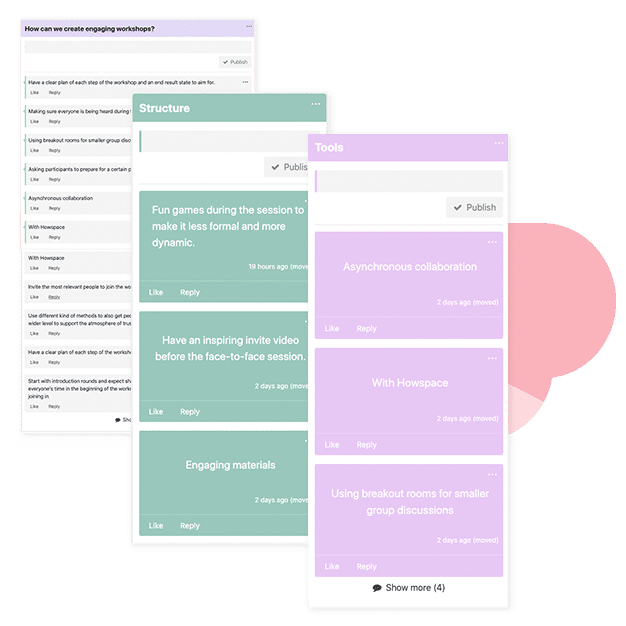
  • Super Chat with sticky notes: Brainstorm, categorize, and prioritize discussions and topics in a visual and inspiring way.
  • Built-in AI Insight: Understand and analyze group discussions and make sense of large-scale dialogue in real-time.

💬 Unleash Everyone’s Creativity

Howspace was developed to give people endless possibilities for designing structured discussions. We believe that change happens conversation by conversation. As people have the intrinsic need to be heard, we aim to offer ways for organizations to hear their employees and collaborate.

Howspace’s Super Chat widget has two chat modes: discussion & sticky note. Sticky note mode allows you to unleash everyone’s creativity—ideate, collaborate, and play all together. You can move, categorize, and prioritize color-coded comments so it’s perfect for collecting ideas and making sense of a huge amount of comments. You can activate and engage participants by inviting them to categorize comments.

Super Chat with sticky notes can be used in project management, workshops, or even learning processes where you start at step one and move forward.

🧠 Large-scale Sensemaking Is Just a Click Away
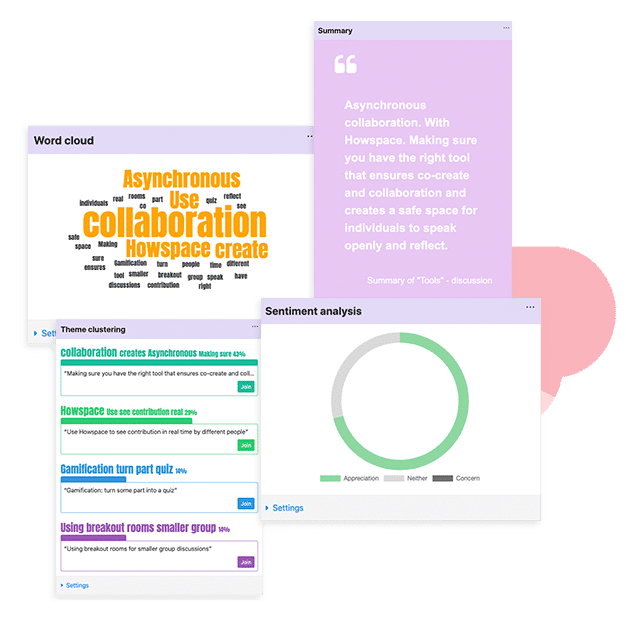

With the help of built-in AI Insight, you can build a better and more comprehensive understanding of discussions. Watch a word cloud assemble in real time from large-scale dialogue, and make objective summaries of current discussions.

Getting the interactive insights available for everyone in the workspace makes large-scale sensemaking easier than ever. You can pull the analysis to your page and enjoy the insights in real time. Or you can add AI Insight widgets to the different pages of your workspace and filter based on user list, profile fields, and much more.

For example, you might want to see a word cloud analysis of what everyone from the marketing team says about the current organizational culture. Or you might want to see an overview of the themes created when the finance team discusses the future of work.

The possibilities are endless, your imagination sets the boundaries of how and what you want to analyze with the new AI Insights.

Design Your Own Way To Facilitate Collaboration

At the core of Howspace is not what we do, but what you do. You know best how to facilitate the collaboration process so that things move ahead smoothly and generate a feeling of togetherness. Howspace is the platform that will help encourage participation and help you make sense of discussions so that everyone’s efforts play a role in the greater impact.

If you’re curious about Howspace, why not give it a try? You can access Howspace free for 30 days and experiment with the tips shared in this article by starting your free trial—no credit card required.

– Howspace Team

There are two main reasons why virtual meetings run late: people are not showing on time or there are some technical issues in the beginning or during the meeting. This time we will focus on the people aspect of the issue.

We’ve all been there: a virtual meeting has already started some time ago when someone comes in late. They apologize for being late, give an explanation and soon ask for a chance to speak. Then they comment on a topic and with the same arguments that the speaker has just moments earlier already addressed.

This has been a constant problem with virtual events. In the beginning of each event, meeting and workshop, the things that are usually discusses are for instance:

  • planned structure of the event
  • goals of the event

In addition, you as a host have probably also created a base for the meeting. The ones that come in late have missed this and they might then miss the concept and the bigger picture.

Some people seem to think that the beginning part is usually boring and they end up skipping these on purpose. As individuals these people get the points that they want out of these events but while doing so the entire community is hurting.

There are also various examples of situations where the participants of a virtual event have been having fruitful, constructive discussions. People have been able to get their voices out and different kinds of points of views have been addressed. New ideas have come up and problems have been already solved.

The ones that have been late and joined the event in the later parts have not been aware of what has already been discussed and solved. The late comer has then started to criticize the solutions without knowing the reasons and logic behind them.

Things You Can Do Before And During The Event

Probably everyone agrees that the participants who came in late are themselves responsible for adjusting to the event. Still, to make things run as smoothly as possible, there are things that you as the host can do. Good people skills in remote work and in general come handy here.

When reading your tips, remember that hybrid events might require two sets of instructions.

Prepare instructions for people that are late.

At least in our experience it’s a lot better to have instructions for people being late already before the meeting. Then, when someone arrives late, you can quickly share the instructions. The idea in the instructions is to encourage the participant to keep other participants in mind and to shortly get to know the materials first before starting to make any questions.

Make the inference path as clear as possible.

You can also make things easier for the participants that are late by utilizing the shared files or a digital collaboration platform that you have been using during the event. You can encourage the ones that are late to get to know the content of these files and platforms before making questions.

Have a short recap of the session so far

If you think that it’s possible to make a short summary of all the things that have already been discussed without it being a problem to the other participants, do that. While doing so, you can ask the participant who came in late to draw the focus already to things that are important next.

What If Someone Is Always Late?

If you are just a guest host or a presenter, you most likely have no prior experience of the ones that are late in your event.

If however, you are the one usually organizing virtual meetings and events in your company or organization, you might already know that for some, there’s a pattern of being late.

Late from remote meeting

Now you can ask: is it fair to you or any of the participants who show up on time that the event gets interrupted and usually by one or two people? No, it’s not. A change in behavior is needed and sometimes it needs tougher actions than one might expect.

You can start preventing people from being late by not allowing them to be late.

  1. Start the meeting always as scheduled and do not let late comers in.
  2. Document the meeting rules and make sure that everyone is aware of them.
  3. Create a system where a participant should make up the time they have lost from arriving late.
  4. Make it mandatory to be there on time.
  5. Consider leaving some time or arrival before the beginning of the actual meeting.
  6. Have meetings start the day.
  7. Have punctuality as a part of the performance review.

Also, to avoid delays on your end, make sure that you have sent all the needed materials and logins to each participant.

What Participants Who Are Late Should Do

If you are the manager or the leader of the organization, you need to communicate to your team what you are expecting from them. This can mean various things and include also letting them know what to do when they know they are going to be late to a meeting

  1. Communication: Make it clear that they know they are going to be late, they need to call or send a message to their supervisor or some other person nominated for this.
  2. Estimation: Ask the team member to give an estimation of the time of arrival. This way the meeting can continue and you are aware of where you might be when the one who’s late finally gets there.
  3. Planning. Make it very clear that the time that they were late from the meeting is a time they also need to cover. Meetings are an equal part of working time as anything else.

Read next: The Role Of Project Management In a Small Business

The tasks of a facilitator are mostly very rewarding but also at times challenging to say the least. Now, when companies are shifting from remote work to hybrid model, the hybrid events and new kinds of challenges are here.

Facilitating Hybrid Events

To many it seems that at the moment setting up the events and preparing for them takes twice as much time. This comes as no surprise, since in hybrid events there are actually two different events or workshops happening at the same time. Unfortunately, this can be stressful for both the facilitator and participants.

According to our latest discussions with professional facilitators, many of them feel that to have the hybrid event run smoothly it actually needs two separate facilitators: one for the online participants and one for the ones that are on venue.

One of the key points that arise in discussions with facilitators (and organizations that use them in their events) is to evaluate what kind of added value a hybrid model in events is actually bringing. Some even say that it’s best to have the entire event as a remote one: this way every participant is equal. A remote event is also much easier to handle

What Is A Hybrid Event?

A hybrid event is simply a combination of different ways to participate. In hybrid events the participants and the speakers are partly present on location and others remotely. In other words, hybrid events are combining in-person and virtual event experiences. This means that there’s basically two events in one – or at least two different kinds of experiences for the participants. (Lakkaneva & Tirronen 2021)

Hybrid events can be live ones or recordings. The way you want to organize the event depends on your goals for it. To make the hybrid event a success, you need to find a way for the physical component to integrate well with your online audience. Each participant should hear the speakers well and participate in all activities as planned. (Chapa 2021)

Hybrid events plan

One thing to keep in mind is that a live stream does not yet make an event a hybrid event. When we are talking about real hybrid events they need to include the best parts of both worlds. These events are expected to create an interactive and engaging experience from all locations. (Chapa 2021)

Benefits of Hybrid Events

  • You can grow your audience with offering a chance to participate also virtually
  • You can reach the attendance numbers you are hoping for
  • Your sponsorship value also increases
  • Offers flexibility
  • Reduces costs

Three Examples Of Hybrid Events

Hybrid events can be formed in three parts that are as follows:

  1. Speaker(s) and part of the participants are present and part of them are present remotely.
  2. Speaker(s) are present and all participants are participating remotely.
  3. Speaker(s) and a part of participants are present and some of the participants are joining from remote offices together. (Lakkaneva & Tirronen 2021)

In our experience the majority of all hybrid events are the ones where speaker or speakers and part of the participants are present at the venue and part of them present online.

Different Roles In Hybrid Events

Hybrid events require more planning than you might think. In many cases they also need more people than just one person trying to conduct the entire show.

If you really want your hybrid event to succeed, you should think about setting up people for each of these positions:

  • The facilitator / host
  • An expert / presenter
  • Technical support
  • Moderator for the chat
  • Note taker
  • Graphic facilitators

It’s understandable that not all have the possibility to have all of those positions filled. The most important parts that should, however, be always covered, are the facilitator and someone taking care of the technical matters. (Lakkaneva & Tirronen 2021)

Hybrid events must always have at least someone leading it. This does not automatically mean a facilitator, but it can also be a speaker or the organizator. For the hybrid event to run as smoothly as possible it is essential to have a separate person in charge of the technical things – especially during the event. This person can also be in charge of moderating the chat, if you don’t have anyone in particular assigned to that. (Lakkaneva & Tirronen 2021)

Note! Participants are of course an important part of the event. They should be informed about all the possible aspects of the event well before it. One thing to note is that participants are responsible for themselves, too. This means that they should get to know the event beforehand and to make sure that they know all the technical requirements to attend it.

In our experience the more roles you have covered during a hybrid event the more pleasant it is for the attendees. Having attended various hybrid events over the past few years it’s also good to point out that no matter what you as an organizer do, there will always be those attending that have not read your or listened to your instructions. These people are not your responsibility or your fault, and all other participants do understand that.

How To Facilitate a Successful Hybrid Event

  1. Double plan
  2. Set up a clear schedule
  3. “Over-instruct”

To facilitate a successful hybrid event there are certain steps you should take. First of all, make the goal of the event as clear as possible. Once it’s done, double plan. This means that you really need to plan two events simultaneously. (Lakkaneva & Tirronen 2021)

The next step is to make sure that there are no technical issues. The only way to do this is to test the software and gadgets that you are using. Make sure to test the speed of your internet connection, too. (Lakkaneva & Tirronen 2021) Participants usually understand that sometimes there are issues with software and internet connections but if the entire event starts with problems, it sets a certain, not-wanted tune for the rest of the event.

Remember that it is always better to “over-instruct” the attendees, not only before but during and after the hybrid event. And last but not least, to be prepared to react. (Lakkaneva & Tirronen 2021) From a participant-point-of-view it’s better that everything is explained in detail. This makes the participants feel safe and calm, even without that much prior experience in attending hybrid events.

For you to deliver a successful hybrid event, you must also have a deeper understanding of different profiles and roles. This means that you should consider the participants’ objectives for participating in your events and what kind of content they would most likely like to see and experience. One key factor here is also choosing the right type of digital environment and a venue. (Fletcher 2021)

Sometimes facilitators are sending questionnaires before the actual event to find out about these. In our opinion that can make the participants feel like they need to come up with the content of the hybrid event, which is not always the best feeling.

Something to think about is also that in a hybrid event environment most participants are usually there online. It is still important that all the speakers are actually speaking to both audiences, not just the ones there in the venue or online. (Fletcher 2021) This might be clear for you already but in reality, in many hybrid events that we have participated in, the other audience has been forgotten or at least not taken into consideration that well.

  • Make sure that the agenda is well balanced.
  • Have host-speakers
  • Make sure that the in-person audience and online audience can connect easily.
  • The better you are prepared the better chances you have to succeed

Basically, when you are planning a hybrid business event, it means that you need to plan two events at the same time. If you think this is too much work, you shouldn’t try to organize a hybrid event in the first place. (Lakkaneva & Tirronen 2021)

If that’s really the case, we recommend that you plan a virtual event only, or an on location event only. You can also test the hybrid event with a smaller audience first and see how it feels.

Before the Hybrid Event

It’s not only what happens during the event that requires two different ways to plan and instruct it. You need to inform the participants twice: one set of instructions for the ones that are arriving at the location and one set for the ones that are participating remotely. (Lakkaneva & Tirronen 2021)

Hybrid event planning

Instructions For The Remote Participant

Let the participants know when and how they can access the event. Also inform them about all the additional technical requirements or recommendations for instance for the best browser. (Lakkaneva & Tirronen 2021) The browser point is surprisingly important – not all understand what types of affects it has.

You can also recommend a headset microphone etc. If someone wants to test the platform before the event, tell them how this can be done. Also share the contact information of the technical support, if you happen to have one. (Lakkaneva & Tirronen 2021)

Instructions For The Ones At Location

Let the participants know where to arrive (the address, parking lots etc). You can also add a link to a map. Also, if the event requires laptops or other tools and gadgets, ask them to bring them. (Lakkaneva & Tirronen 2021)

As said before, there can always be those participants that have not read your instructions. This can be disappointing and stressful, but you are probably already used to that. Remember also, that on most events someone is always late. Tips on how to deal with that – read more here!

During The Hybrid Event

If there are a lot of technical newbies participating remotely, it’s best to use the first fifteen minutes or so to be reserved for them to test the software. Introduce the participants to all tools used in the event. Instruct people with microphones also. (Lakkaneva & Tirronen 2021)

For people that are used to participating in hybrid events and are familiar with various digital facilitation tools, these instructional parts are usually easy and sometimes tiresome to follow. Could you come up with something that would make the beginning of the instructional part slightly different from the usual ways of doing it?

If you are going to record the event, tell the participants about that. Instruct them on how to make their voices heard during the event. You can also share information about the breaks, rules etc. (Lakkaneva & Tirronen 2021)

From a participators’ point of view it’s very important to hear why and when the event is recorded. This is important especially when the participant has little or no prior experience in attending remote or hybrid events. If the reason for recording the event is not presented, it might cause uneasiness in the participant. So the better everyone really is informed the safer they feel and the more likely they are also active participants during the entire event.

After the Event

It’s important that after the hybrid event you as a facilitator/organizer have a short feedback discussion. Here you can all go through the event: what went well, what should be improved for the next time and how you go forward. (Lakkaneva & Tirronen 2021)

In our experience it’s also nice to have a feedback questionnaire as a participant. Of course not everyone likes to give feedback, no matter if it’s a short questionnaire or a larger poll. But as long as the feedback asked is voluntary, it’s better to send out those for all participants and preferably right after the hybrid event is over. You can also ask about the tools for remote work that you used in the event: this way you’ll know if some remote project management tools need to be replaced.

Sources:

Chapa, K. 2021. How to Host a Hybrid Event: A Hybrid Event Checklist. Delta Marketing. Accessed 7 December 2021. https://www.godelta.com/blog/how-to-host-a-hybrid-event

Fletcher, M. 2021. Four Pillars for Planning Virtual and Hybrid Events. Cvent. Accessed 7 December 2021. https://www.cvent.com/uk/blog/events/four-pillars-planning-virtual-and-hybrid-events.

Lakkaneva, T., Tirronen, U. 2021. Hybridiopas Käytännön vinkit hybriditilaisuuden järjestämiseen ja fasilitointiin. Bluescreen404. Accessed 7 December 2021. https://f.hubspotusercontent10.net/hubfs/5844313/Hybridiopas.pdf.

Being a facilitator is rewarding but challenging. Now when organizing and facilitating hybrid events is becoming the new normal, we are interested to learn more about facilitators’ experiences about the challenges they are facing. If you are a facilitator and would like to share your thoughts, drop as a note at contact@digitalcollaborationtool.com!

This article evaluates the prerequisites in leadership qualities that different organizations and companies need in diverse, digital working environments when they wish to sustain and engage their workforce.

The article was originally made as an essay for MBA studies in Lapland UAS but is now published also here. The article is based on the findings of Christopher Mulligan and Graig Taylor, and which have been presented in Talent Keepers: How Top Leaders Engage and Retain Their Best Performers (2019). Alongside the findings in their book I have used a case example of a freelancer working for a digital marketing company.

Why was the case chosen? Because there were so many examples of how leadership in a digital environment was not executed in a way that would have sustained or engaged talented and valuable workforce. The diversity or the digital working conditions were not addressed in the best possible way.

Engagement of Workforce

Engaged workforce needs credible leadership and high performing organization. Job and career satisfaction are important, as are supportive co-workers.  When the workforce is engaged, companies get committed employees. The organization becomes productive and profitable, and the customers are satisfied and loyal. (Mulligan & Taylor 2019, 35.)

Digital working environment

Key Drivers of Employee Engagement

There are four main drivers of employee engagement: organizational factors, job/career satisfaction, co-worker relationships and credible leadership. Of these, the most controllable one is the quality of leadership. (Mulligan & Taylor 2019, 30)

Accountability

High engagement and retention can increase through effective strategies. There are no simple solutions that would fit all organizations (Mulligan & Taylor 2021, 9) Engaging talent is not something that only the HR department can do. Instead, the focus should be in the leaders and how they own strategies and outcomes. (Mulligan & Taylor 2019, 13)

Great leaders are those that hold themselves accountable. When they do that and energize the company’s most talented employees, all aspects of the company start improving. (Mulligan & Taylor 2019, 15)

Digital work environment

Career Growth

Leaders should set performance expectations, provide feedback and five appropriate coaching. (Mulligan & Taylor 2019,101) Here open communication is vital. The responsibilities and roles need to be clarified so that there would not be room for misunderstandings. There needs to be opportunities for employees to grow their skills and roles. (Mulligan & Taylor 2019, 103.)

A small digital marketing company and a freelancer working as a content writer and a Junior SEO Executive had been working together for 3 years. The owner, based on the recommendations of one of his managers, wanted the freelancer to start working in a more demanding position, remotely as the freelancer had been working so far.

However, the owner was not interested in what the freelancer already knew or what she had been doing with her own projects. Instead, he saw the freelancer as someone he needs to train starting from the very basics for the new position. He did not listen to the freelancer when she tried to explain to him that there were only a couple of tools used that she needed guidance in.

The issue seemed to be that the freelancer was a woman with a higher education and couldn’t possibly have knowledge or expertise in a very manly industry. This was seen in meetings where the only opinions and views that were accepted were coming from men, even when they did not have the same background with the subject as the freelancer did.

Soon the owner started using the freelancer just for the same things that he had used before, and nothing changed in the job itself. The only thing that changed were the conditions of working. The owner suddenly decided that the working time of the freelancer had to be monitored. So he set up a monitoring plugin for Slack, which the freelancer took as an insult. She was well-known for her dedication and commitment to the companies she had been working with, and all of a sudden she was clearly doubted.

The potential and knowledge of the freelancer was ignored but her availability was suddenly always required, even late in the evenings. The freelancer was treated as a secretary and not an SEO professional. The freelancer felt disappointed, not trusted, not heard, and harassed by the owner with late-night messages and calls. The most disappointing thing was that the promised career growth was not happening.

After leaving this company the freelancer received an identical job from another company. This company instantly gave her freedom and responsibilities, valuing her opinions and experience with her own projects. In less than 6 months the work she did had significant impacts on how the project succeeded in Google Search and more importantly, in the revenue streams.

Communication Skills

Good leaders need to communicate their expectations clearly in diverse organizations. By great communication skills leaders can be trusted. When they listen to suggestions, provide feedback, and recognize individual efforts, they are more trusted as leaders and gain a more engaged workforce. (Mulligan & Taylor 2019, 41).

In the case study the mistake that the company owner made with communication was that he did not talk about the freelancer’s background, experience, and knowledge before appointing her to the new position.The owner failed also when communicating about the working conditions that would change from total freedom to being controlled and always monitored. He also non verbally communicated the lack of respect for her as she was a woman when ignoring her views and listening to only the men, which happened constantly.

The company owner also did not want to communicate with video calls but instead wanted to use Slack for writing only. Since he had poor English skills and no understanding of normal etiquette, his communication seemed rude.

For a millennial, having worked in a digital environment for many years at this point, the company owner’s need to monitor her constantly was a slap in the face. She felt like she wasn’t believed, which affected her motivation to continue.

Working Conditions

When a highly engaged workforce is excelling in their roles and then there’s a change in working conditions, a new commitment to the new role or leader is needed. If the new leader is not providing the same tools and working styles than the previous one, and the new style is experienced as worse, the engagement starts to go lower. (Mulligan & Taylor 2019, 71).

Before accepting the new position, the freelancer had been working with another manager, not with the owner. Earlier things were organized and straightforward. There was no monitoring of working hours or certain times during a day when the freelancer was supposed to be available. The working conditions changed drastically when the new position started.

The owner expected his employees and freelancers to work 8 hours minimum a day. The only way to receive bonuses in his company was to work 12–14 hours every day. The quality of work and what the freelancer was actually getting done, were not important. Monitoring if the freelancer was online and in front of the computer was constant. Every part of the work was micromanaged by the owner.

This changed the level of commitment and motivation for the freelancer. The engagement that had been built with the manager earlier, was gone in just a couple of weeks.

Different Backgrounds, Personalities and Types

Subgroups with identifiable attributes should not be ignored, but neither should individuals and their personalities or backgrounds. Subgroups can have different work styles, motivations, and career aspirations. Also, high performers should be separated from others. When leaders pay attention to subgroups, it helps them in identifying better strategies. (Mulligan & Taylor 2019, 62)

The owner of the company did not care to take into consideration the prior experience or education of the freelancer or the fact that she indeed was the high performer of the entire team.

When it comes to education, she was more educated than the owner or other employees and freelancers working for him. He wasn’t interested to know anything about the freelancer, even though this would have made communication between the two easier on many levels. The personalities and the working styles between the freelancer and the owner were too much apart and the owner lacked the skills to identify the strengths of the freelancer.

Instead, he made assumptions based on her gender and her being a single parent. He also did not think about the fact that the freelancer had been working in a digital environment for many years without ever being monitored. The possibility to work remotely usually comes with a certain freedom and now all of that was taken from the freelancer.

Conclusions

Based on the findings on Talent Keepers How Top Leaders Engage and Retain Their Best Performers (2019), and the case presented in this report, to get the workforce engaged and sustain it in diverse organizations, a leader needs to be sensitive to different people: to take into consideration their personal traits and qualities, prior knowledge, and their aspirations for the future.

Not all leadership styles are suitable for everyone, and a good leader takes this into consideration also in communication. Leaders of diverse organizations need to give more thought on their communication skills and different types of people with different backgrounds and needs. In a diverse organization a leader should be there to excite, motivate, support, guide and create possibilities.

Good leaders give freedom instead of micromanaging and trust their employees. They don’t make assumptions based on employees’ gender, race, age or personal life. They seek to see the bigger picture and find out how to make the working conditions such that lead to a better working environment and through that to engagement and better results.

References

Mulligan, C. Taylor, G., Talent Keepers. How Top Leaders Engage and Retain
Their Best Performers. April 2019. John Wiley & Sons, Incorporated. [Ebook].
Accessed 22nd October 2021. https://ebookcentral-proquestcom.ez.lapinamk.fi/lib/ulapland-ebooks/reader.action?docID=5748881

People skills in remote work and studies have become increasingly over the past couple of years, but what are those skills and can you learn them?

Even though we are talking about digital tools and are working in various teams at the moment, the majority of our team members – me included – are not huge fans of group work and assignments during studies.

This is mostly because students tend to have different levels of motivation and this sets challenges to the cooperation, at least when you want it to be effective. However, be it remote studies or remote work, each of us needs people skills, and to us it seems like these are put into a test especially in a school environment.

Since many students seem to be coming with different reasons and levels of motivation, the workflow might be different than to which you have been used to in working life. On the other hand, during our remote studies, we’ve learned that people skills are not as big of a test as they are when you are in a traditional class environment.

When you don’t see the people in front of you, it’s easier to let things go and not be stressed over every single detail.

If you have been studying somewhere over the past 20 years or so, you have probably heard more than enough about the importance of group work. Yep, they keep telling us that group work teaches you valuable lessons that you can utilize in working life.

But up to this day, I have failed to see the value of those endless times I have been trying to reach team members, asking them to be ready by deadline and so on. One of the most important people skills in working life is patience and this, this indeed has been tested during my studies.

Group work skills are of course important, there’s no denying of that. On the other hand, it feels like the emphasis is too much on group work, when in fact it should be in people skills.

At least in my experience, people skills are the most important skills and group work skills are only a small part of a bigger picture. But how about people skills in remote work and remote studies? Are there some things that are different from the traditional way of working or studying? To me it seems like, not really.

What Are People Skills?

Before we dive deeper into the wonderful pool of people skills in remote work and studies, let’s break the term down quickly.

Basically, people skills are about how you communicate, listen to others and relate to them, be it on a personal or professional level. In my experience, you can put empathy and respect for others, and problem solving skills to this category, too.

TOP 10 People Skills in Remote Work and Studies

  • Self-confidence
  • Empathy
  • Assertiveness
  • Understanding boundaries
  • Communication
  • Leadership skills
  • Active listening
  • Negotiation
  • Ability to delegate
  • Good manners

Based on my own experiences in both student and working life, I gathered this list of the top 10 skills for remote work and studies. These are just my own opinions and not something that is set in stone.

You may feel like some of the things listed above are not important at all and your list might look a lot different. Please do share your views in the comment section, very much appreciated!

When you look at the list you might spot the same thing as I did: many of these skills are intertwined and basically, can even be seen as just different ways of expressing the same thing.

People skills in remote work studies

Also something I would like to note here is that if you feel like some of these skills don’t come out as naturally for you, there’s no reason to worry. We can all learn these and in fact, I believe that this is a never-ending process that goes on both in remote work, studies and in your personal life.

Empathy, Active Listening and Good Manners

Empathy is probably the most important skill that you can have both as a working professional and as a human being in your personal life. Closely linked to empathy, I’ve listed active listening and good manners there, too.

Active listening is not the same thing as just listening to someone. People tend to listen to each other in a way that instead of actually listening to what they are being told, they are already thinking of their own response. This is not active listening.

Active listening means that you focus on what the person is saying and trying to say. Listen carefully, ask questions and take your time before giving your response. Active listeners do not interrupt the speaker but they really make an effort on listening and giving their response accordingly.

Active listening is a win-win for both parties: you can identify even the smallest details more easily and the other party feels respected and heard. Active listening is important also when you are using digital facilitation tools in your projects.

Active Listening In Remote Communication

How does this work in remote communication then? Is it possible to practice active listening online? Of course it is. You can be a great active listener in Skype/Zoom/Teams meetings and lectures.

In fact, for many of us it seems like active listening is much easier online: you are not face-to-face with the person and you have your own space, where you can process what you are hearing.

Leadership in remote work life

Also, when communicating by writing, you really have more time to take in what the other one is saying. On the other hand, with writing especially, there’s greater risk of misunderstandings.

Empathy and compassion might sound something that you cannot express that easily when working or studying remotely. In my experience, this all depends on the relationships that you have formed with your peers in remote teams and remote classes.

Compassion and empathy are skills that come especially handy in those situations, where you need to be diffusing heated discussions. These heated situations can occur because people feel overwhelmed or preoccupied, or they are having personal stress for instance. Empathy is all about being able to relate to others and their feelings.

To me it seems like expressing empathy is slightly more difficult in remote communication since people can hide their emotions more easily than when interacting with them face-to-face.

Anyways, the most important thing that you need to remember is that you make sure that others know that you understand their positions and feelings. When you add general good manners to this behaviour, you are mastering many important people skills in remote work and studies all at once.

Politeness shows others that you respect them and value their time and opinions. It’s usually the most simple things that make the difference: a hello, how are you, as your first Skype message to your remote team members is already a great starting point.

Delegate and Lead

A huge part of people skills in remote work and studies, at least in my experience, are also leadership skills and the ability to delegate. This applies to all positions within your organization and your career.

Great leaders are able to recognize strengths and weaknesses of each team member. I can understand that in remote work it’s more difficult to delegate tasks for those that are not physically at the office, but in today’s world, this is almost a must.

I myself appreciate and think very highly of the biggest client company that I have at the moment: they have given me huge responsibilities even though I am working from another country and never was a part of their team in the office before joining the project.

I’ve worked with leaders that are unable to delegate and trust their employees or freelancers. That is simply the biggest mistake these leaders can make. Even if they try to delegate they usually end up micromanaging which leads to people thinking that they are not trusted and respected.

In general, I’d say that leadership skills are important for us all, no matter where you work and in what position. When you recognize the weaknesses and strengths of others, assign tasks to them accordingly and are an active listener, you learn how to delegate effectively. Delegation is important in all aspects of the processes, also when you are using remote project management tools for instance.

Negotiation Skills and Communication

All of the people skills in remote work and studies that are already mentioned above, are boosted with communication skills and negotiation skills.

Whatever the industry you are working and the position you are in, clear and productive communication is the key to success. When you can express yourself in a clear way and are able to understand others’ way of communication, many problems and misunderstandings can be avoided.

This again requires things like active listening. To help others understand you, learn how to communicate in a clear way: take into consideration what you are really wanting to say and who you are talking to, what type of communicators they are and so on.

Negotiation skills are beneficial in all positions and in your studies, too . In fact, these people skills in remote work will benefit you not only in your professional but personal life, too

People Skills In Remote Work Are The Same Than In Other Parts Of Your Life

As I mentioned already in the very beginning of this post, each of the people skills in remote work are intertwined. And to remind you: these are not set in stone, these are just the people skills that I personally have found as the most important ones.

Each of these skills are important not only in business but in personal life, too. The key to success, at least in my experience, is that you just need to remember that these skills are about continuous learning and you will never be ready: there’s always room for improvement.

Read next: Leadership in Remote Work

Hybrid work is the latest buzzword on everyone’s lips. While some companies have been working in a hybrid environment well before the pandemic, it’s a whole new world of work for many organizations. And it can be much more challenging compared to a fully virtual or in-office work model.

Fortunately, there are strategies and tools available to help make the transition to hybrid work smoother. Howspace is a digital collaboration platform that allows you to facilitate meaningful conversations in the hybrid environment. Let’s dive into how this platform can help you solve common hybrid work challenges.

Howspace hybrid work


1. Foster Strong Connections Among Employees

A top challenge with hybrid work is not feeling connected to colleagues, according to a 2021 global Howspace survey. Human interaction can be lacking when working remotely, which puts pressure on the mental state of employees.

Building connections among a distributed workforce requires being intentional. Having a shared virtual space within Howspace allows employees to communicate with each other, share ideas, support one another, and feel part of a community.

By paying attention to meeting design and asking check-in and check-out questions within Howspace, you can incorporate relationship building in all your group interactions. For example, simply asking how others are doing as people—not just employees—gives room for everyone to openly share their thoughts.

A check-in question that all participants were invited to answer by using the Howspace annotation tool.

For more insights from the Howspace survey and strategies to make a smooth transition to hybrid work, get your free copy of the Howspace hybrid work model playbook here.

2. Reduce Presenteeism

Many employers have an underlying “proximity bias,” meaning they favor the employees they see in-person. Presenteeism can cause employees to feel pressured into coming to the office in order to get promotions or better pay—even if working remotely better suits their needs.

One way leaders can reduce presenteeism in the hybrid workplace is by making positive assumptions—which is in line with one of Howspace’s guiding principles. If you don’t understand someone’s decision, you can ask from a reinforcing point of view as to why that decision was made so that you can better understand their intentions.

You can help prevent proximity bias and other biases by having regular open and honest conversations with your employees within Howspace. Enable employees to have difficult conversations by allowing them to share their thoughts in whichever way they feel most comfortable, which could be in writing or anonymously, as seen below:

Hybrid work Howspace
A Howspace customer’s workspace where participants were invited to share their written comments anonymously.

3. Deal With Digital Overwhelm

Feeling overwhelmed with more meetings and messages was another top challenge with hybrid work, according to the Howspace survey results. While virtual meetings are needed from time to time, they’re playing too heavy of a role in the hybrid work environment.

To combat this challenge, use meetings as the last resort—rather than the default way—to discuss things together as a group. Instead of scheduling live meetings for status updates and recaps, communicate asynchronously on Howspace instead. Howspace enables you to create a transparent dialogue between a limitless amount of people, no matter where they are. This makes it easy for everyone to take part in discussions and voice opinions at any point.

When you do decide a meeting is necessary, make sure participants understand the reason why they’re present and what they’re trying to achieve. You can set the context and agenda well beforehand, and invite participants to do some pre-work within the Howspace workspace to tune into the topic.

4. Overcome Coordination And Scheduling Issues

When employees are working from the office on different days of the week with schedules that don’t overlap, they might miss out on the benefits of face-to-face, synchronous work. But what if you don’t want to enforce rules for when employees should be at the office so as to maintain the flexibility people had during the pandemic when working from home?

Employees will likely feel good about travelling to the office to form meaningful connections for a specific purpose, such as for projects that require collaboration, brainstorming, or group creativity. But they won’t want to travel to a high-distraction environment just to fall behind on their deep-focus or admin work.

There is no cookie-cutter solution for organizations when it comes to the hybrid work model. The key to success is to co-create the model with everyone in your company. And that’s exactly what Howspace was built for—to inspire co-creation and boost engagement. Compared to just working with video conferencing and online messaging tools, Howspace enables ongoing and transparent collaboration between all participants.

5. Break Down The Human Capital Silos

Research has shown that younger workers have especially suffered during the pandemic due to having less time with their more experienced colleagues from whom they can learn new things.

To help you bring talent with different experience levels together, create a mentorship program. Senior employees can mentor newer employees and have regular sessions to track the newer employees’ progress. You can organize these sessions in a Howspace workspace where it’s possible to share resources and videos, have live calls, build custom activities to gauge progress, and create a learning journey for the newer employees.

Howspace differs from other online collaboration tools in a way that facilitators can guide the conversation and empower individuals to use the platform to drive deep change.

If you’re curious about Howspace, why not give it a try? You can access Howspace free for 30 days and experiment with the tips shared in this article by starting your free trial—no credit card required.

Well-being consists of multiple parts. Each of us have our own definition for well being and factors that are affecting it. When it comes to our well-being, we also tend to value different things related to it.

Generally speaking one might say that things like health, environment, social relationships and the ability to do the things that are important to a person, are all parts of well-being. Today there are multiple tools for monitoring well-being, which are becoming increasingly popular.

In this post we will discuss big data, open data and myData in relation to well-being data and data management. The article addresses the use of data in well-being services and everyday life, but also the challenges and threats data management systems can have. For this article our team got help from an Master’s student in Xamk, physiotherapist Saija Hyvönen.

Well-being Data

To produce well-being data we need to collect it. This can be done differently, depending on things like the registrar and the facility. In Finland for instance, well-being data is currently collected in various registers. These registers have been in use for a long time already, and the data collected has been used in research and product development for years and years.

But what is data? It is digitally recorded information (symbols, marks) that machines can read. With the help of this data we are able to create documents, databases, transcripts of hearing and audio recordings. Basically, data is just raw material and by processing it, we can create meaningful information that we can use in various ways.

Data is being analyzed and utilized in different levels of organization and processes. With the help of data we can get answers to questions such as

  • What has happened
  • Why something is happening
  • What should be done to make something happen

“In my work as a physiotherapist I collect data from the customer visits. Will the customer book a new appointment or not? If they don’t book another appointment, is it because their issue got resolved already on the first visit? I also collect data about customer satisfaction. This I do by a simple but effective questionnaire that the customer can fill after the visit. With the collected data I can see the quality of my treatments and also make changes for the future” Saija Hyvönen says.

Well-being Information In Finland Now And In The Future

The health and well-being data collected from citizens and the data collected by social services, the use of health and well-being data from the population and the use of health services and quality of the information available to citizens, social and health service providers and the public system, research institutions and businesses.

In Finland, however, the situation has long been that well-being data collected on individuals, such as patient and lifestyle data, is scattered in different systems and difficult to use. (Parikka et al. 2020, 10).

“In my own work as a physiotherapist, I find it challenging that when my clients come to my practice, I rarely get complete medical records on them, which could have a big impact on the course of treatment and speed up the initial assessment. For example, the information may be in my own file, in two different private hospital health records and as a multiple envelope during a visit. In addition, the client may still show the data measured by the smartwatch, which, depending on the device and measurement method, may either be useful or not” says Saija.

According to Tuomisto (2015), the patient himself will in future become an important information provider and may provide the doctor with, for example, exercise data collected by the mobile phone, which should enable an assessment of its relevance to health. On the other hand, patients will be able to make more thorough self-assessments and comparisons online and offer their own diagnosis and treatment recommendations to the doctor (and physiotherapist). The role of the doctor is changing from expert authority to coach.

“The problem I see in the work of physiotherapists is that, as self-diagnosis becomes more and more common, clients increasingly come to the doctor’s office with a ready-made diagnosis that they have worked out themselves, but this is not necessarily the case” Saija says and continues:

“This is a collision course with the first treatment session, when the client’s perception of the condition in question may be completely changed and the course of treatment may be different from what had been anticipated. It may seem strange, but some people may be disappointed when a sore shoulder is treated with rehabilitation rather than being put on the operating table.”

Three Different Types of Data

High-quality data is an extremely important raw material for research and innovation. In the future, access to data and the ability to use and combine it creatively will be key to developing new business models and effective governance. (Parikka et al. 2020, 1.)

In the future, people will have even better ways to manage and promote their own health as applications, data and genetic technologies develop. It is estimated that by 2030, an AI-enhanced platform economy and new data-driven services will account for at best 30% of the Finnish economy. (Parikka et al. 2020, 1.)

Big Data

Big data describes data volumes that are so large and diverse that they require technologies and practices that differ from traditional data processing to store and process them. (Sutinen 2016, 11.) Big data includes, for example, log data from websites or social media usage data, which are constantly growing and changing. We constantly leave a trace when we use the internet and getting rid of it can be challenging, usually impossible.

There are three commonly recognised characteristics for identifying Big Data. These characteristics, which distinguish big data from ordinary data, are:

  • volume,
  • velocity, and
  • variety.

In terms of volume, big data deals with data that cannot be measured in terabytes or petabytes. Big data operates at a scale where non-traditional storage and analysis methods are required to analyse and store the data. Speed refers to the speed at which new data is created and the time it takes to be able to analyse the data. (Sutinen 2016, 11.)

A good example of Big Data is the use of social media data. Social social media can be used to track users’ interests, which can be used to influence, for example, targeted marketing.

There may be concern about how much data is available on one’s own online behaviour and targeted ads appear in front of the eyes. Every day, social media presents online services, courses and products related to health and well-being.

Mass data is becoming more and more common and more and more data is becoming freely available. In Finland, mass data is used in areas such as molecular biology and public health, making use of datasets related to these topics, especially from a Finnish perspective.

There are several important datasets in our country that are not yet being used effectively. Mass data has already provided significant benefits, particularly in understanding cellular phenomena, but the public health and individual choice benefits are only beginning to emerge. (Tuomisto, J. 2015.) Data and evidence can be used to better improve welfare services, bring clarity to decision-making and meet the need for services.

Open Data

Open data is information in digital format that is freely available to anyone for any use, as long as the original source is acknowledged. (Avoindata.fi 2021.)

The Avoindata.fi website lists three things to consider with regard to open data:

  1. The data must be discoverable and accessible on the Internet in its entirety and free of charge in a usable and editable format.
  2. It is freely viewable, downloadable, copyable, modifiable, sharable and accessible by anyone for any lawful activity without any economic, legal, technical, social or practical constraints.
  3. Its terms of use and licenses guarantee the data producer the right to be duly identified, if he so wishes, and the user certainty as to the origin of the data. There are no other conditions restricting use.

For example, THL is constantly producing a lot of open data related to well-being data. THL makes the data it produces and collects openly available and promotes the widespread use of social and health data resources. The data published as open data does not contain personal data or other confidential information. When data is opened, all direct identifying information is removed (THL 2021.)

“The importance of open data in the development of welfare services will certainly increase in the future. The importance of information and data will become more important and health services will rely more and more on researched data and look at the big picture in the light of numbers. Both open data and mass data will contribute to quality data management, making statistics and research more and more part of the future of health services.” Saija points out.

Read also: Best data collecting tools

MyData

MyData is the principle of personal data management and processing, whereby people must be able to manage, access and share the personal data collected about them. If a person does not have the possibility to make use of personal data collected about him or her by someone else, it cannot be called MyData. (Poikola et al. 2018, 5.)

MyData (also omadata) refers on the one hand to human-centered models of personal data management and use that give people the right to their own data, and on the other hand to personal data managed according to such models. The idea is that people themselves can access, manage and pass on data collected about them, such as shopping, mobility, financial or health data.

People-centric data management creates interoperability and minimizes the creation of service locks as data platforms evolve. It reconciles individual rights and high data protection standards with the promotion of data accessibility and business. MyData is a phenomenon, model and future scenario in international development, around which technology and business are gathering momentum. (Poikola et al. 2018, 4.)

Biochipping

As mentioned earlier, people who measure themselves want to acquire information about themselves that will enable them to make decisions about themselves and improve their performance.

The ease and relative affordability of collecting self-reported data has led to a situation where many people are already tracking their activities at some level, for example through a smartphone or smart watch. (Koivunen 2014, 12.)

People already spend much of their time with technology, and it is now an inner curiosity and problem-solving drive to use technology to measure individual or other life-related characteristics. This purposeful monitoring of one’s own activities is known worldwide as self-tracking and these individuals are called self-trackers. In Finland, the term is biohacking and people who do biohacking are called biohackers. (Koivunen 2014, 12.)

“The disadvantage of biohacking is that the more you test, the more you find. It is not always possible for the person to judge whether the findings are necessarily a reason for further action. For example, taking an MRI scan of the back and finding a small bulge or insignificant abrasion may make a person more ill than they really are, because they have data about the finding in their own body.”, Saija says and adds:

“Excessive health monitoring can also cause stress and fear, even anxiety. In my opinion, technological tools and applications that come onto the market should have some form of control and accountability and their use should be based on researched data, or qualitatively good technologies/applications should be given a separate ‘researched good’ label. There are many different sources of health information, but the average consumer may not understand the need to pay attention to the reliability of the information sources.”

Information Security

Information security is the protection of data, systems, services and communications by administrative, technical and other measures. We now live in a world where almost all information and services must be available 24 hours a day, seven days a week, 365 days a year. Digital security enables the digitalisation and uninterrupted functioning of society as a whole.

Digitalisation in an organization means being able to maintain its operations with controlled risks through guidelines, training and exercises. In the workplace, it is the organization’s management that is responsible for the implementation of the digital security aspects. (Eoppiva.fi, 2021.) Digital collaboration tools might also be needed.

Phone-related Security

“In my own life, I have had to think about information security in relation to my own phone usage, among other things. Behind a single code, or often a fingerprint, on a smartphone, there is a huge amount of sensitive personal data: bank details, emails (work and personal), prestored credit card details on websites, phone numbers/addresses, location histories, permissions given to applications (the ones in small print) and all social media channels. “ Saija says and adds:

“For many people, a mobile phone is a communication tool, a work tool, a hobby tool, a streaming service player, etc., which they carry in their pocket or bag more or less from morning to night. We are very vulnerable if our phones fall into the wrong hands.”

Data Security In the Work Of a Physiotherapist

“In my own work, data security protects a huge amount of data. Every day I deal with a patient information system which contains names, addresses, personal identifiers, telephone numbers and patient records. To access this data I need to know many passwords and sometimes double-check my access to the registry with my phone.” Saija says and continues:

“I have undergone the security training required by my employer, but I feel that it has not been comprehensive enough for me to know what to do in the event of a threat. For example, if I discovered a security breach of a medical record, I would have no idea who to report it to first.”

“When dealing with a large amount of sensitive data, the risks inevitably increase. For my own work, for example, maintaining a patient register is a necessity, not only to maintain personal data but also to protect both the physiotherapist providing the treatment and the patient by means of visit records. “What has not been recorded has not happened” was already taught during my physiotherapy studies.”

Thanks, Saija, for letting our team use your school assignment from your Master’s studies in Xamk as a base for this article and thank you for your valuable insights on the topic! Hope to get to work together in the future as well! – DCT team.

You can follow Saija and her studies (in Finnish) on her Instagram account @fysioterapiaa_ja_hyvinvointia

Sources:

Avoindata.fi. 2021. Mitä on avoin data? www-document. Available at: https://www.avoindata.fi/fi/opas/mita-on-avoin-data [accessed 27 September.2021].

Eoppiva. Digiturvallinen työelämä. 2021. Available at: https://www.eoppiva.fi/kurssit/digiturvallinen-tyoelama/#/ [accessed 28 September 2021].

Koivunen, S. 2014. University of Jyväskylä. Tietojenkäsittelytieteiden laitos. Progradu.  Dataa itsestä – kriittiset tekijät omaa toimintaa mittaavan teknologiapalvelun käyttöönotossa. Available at: https://jyx.jyu.fi/bitstream/handle/123456789/45151/1/URN%3ANBN%3Afi%3Ajyu-201501231171.pdf [accessed 27 September 2021].

Parikka, H., Sinipuro, J., Hämäläinen, H,. Kalliola, M,. Luoma-Kyyny, J., Malkamäki, S. 2020. Huomisen hyvinvointia datasta. Sitra. Available at: https://media.sitra.fi/2018/11/27161423/huomisen-hyvinvointia-datasta.pdf [accessed 27 September 2021].

Poikola, A., Kuikkaniemi, K., Kuittinen, O., Honko, H. & Knuutila, A. 2018. Open Knowledge Finland. Liikenne- ja viestintäministeriö. MyData – johdatus ihmiskeskeiseen henkilötiedon hyödyntämiseen. Available at: https://julkaisut.valtioneuvosto.fi/bitstream/handle/10024/160954/MyData%202018.pdf?sequence=4&isAllowed=y [accessed 27 September 2021].

Sutinen, M. 2016. University of Jyväskylä. Tietojenkäsittelytieteiden laitos. Big data ja analytiikka terveydenhuollossa. Available at: Tuomisto, J. 2015. https://jyx.jyu.fi/bitstream/handle/123456789/51135/URN%3ANBN%3Afi%3Ajyu-201608313919.pdf?sequence=1&isAllowed=y [accessed 22 September 2021].

THL. 2021. Avoin data. Available et: https://thl.fi/fi/tilastot-ja-data/aineistot-ja-palvelut/avoin- data [accessed 14 November 2021].

Guest Post by Howspace

Results from Howspace’s new global survey indicate that despite 94% of surveyed respondents feeling well-equipped to transition to a hybrid work model, leadership teams still do not have clarity for how to lead teams and work together with people in a hybrid work environment.

The Howspace hybrid work survey sample was 303 team leaders, consultants, and employees across a range of industries and organization types and sizes in 31 countries between July 1, 2021 to August 6, 2021. In this article, we share key findings from the survey to consider as you make the transition to hybrid work.

A third of respondents said post-COVID working model decisions are made top-down 

When post-COVID working model decisions are made within the leadership team, employees are not asked about their preferences.

Additionally, 20% of respondents who work as employees do not feel that leadership is taking action based on their feedback for how, where, and when they’d like to work.

Howspace hybrid model


The push for going back to the office is largely being driven from the top. Yet especially since COVID-19, employees overwhelmingly expect flexible options. With so many people “rage quitting” their jobs, there’s a lot at stake for leaders when it comes to implementing a hybrid work model. This post-pandemic resignation boom has been dubbed “The Great Resignation,” as people leave their jobs in search of more flexibility, happiness, and money.

By not involving employees in the decision-making process—or not acting on their feedback—you risk losing them for a company that offers what they’re looking for.

Howspace hybrid model work

There is no single right way to do hybrid work

There are disparities in the methods bigger and smaller companies are returning to the office: Large companies (250+ employees) have the strictest policies for remote work, while small to medium-sized companies predominantly plan to offer complete freedom and flexibility around remote work, according to the Howspace survey.

When it comes to hybrid work, there is no cookie-cutter solution for all companies. A hybrid work model will look different for each organization, and co-creating that model with everyone in your company is the key to success.

Organizations need new ways of working both synchronously and asynchronously

The Howspace survey highlights that teams in both large and small companies still have a long way to go to overcome and develop leadership and internal communication challenges.

What’s the solution for overcoming these challenges? For Howspace CEO Ilkka Mäkitalo, the answer does not rely on more tools to improve information sharing and gathering opinions at the workplace.

“Employees are easily using 15 different tools when working remotely or in a hybrid environment. Instead of throwing new tools at the problem, we need to consider how to ensure new ways of working that support learning and development, while still maintaining culture and improving equality throughout the whole organization.

The hybrid era doesn’t mean that we only create ways for collaboration in the setting where we work synchronously, in different locations but at the same time. Leaders should also give people possibilities to work asynchronously and really collaborate all together,” he concludes.

People have very different preferences for sharing their thoughts and opinions within an organization

The survey respondents’ preferences for how to share their thoughts and opinions with others in their organization varies quite a bit, with the majority preferring to share verbally during small in-person meetings

Howspace survey results


A major challenge of hybrid work is how to lead and work together with people who have very different preferences for sharing their thoughts and opinions within an organization.

Not every person feels comfortable sharing their thoughts out loud or in meetings. Plus, Feeling overwhelmed with more meetings and messages was another top challenge with hybrid work, according to our survey results.

The hybrid model calls for new ways of collaborating that allow for a balance of focused work and opportunities to discuss ideas and opinions together.

Finding new ways of working can be done by adapting a facilitator’s mindset—understanding how human relationships work and designing the work to best suit these habits and needs. We can take an exploratory approach and ask ourselves “How can I best accomplish this goal?” rather than automatically booking a meeting, for example. You can read more about Howspace’s findings and tips here!

Want to get more insights from the global Howspace survey? Get your free copy of our ebook: The hybrid work model playbook, including research-backed insights and strategies for making hybrid work successful.